How to Configure An Automatic Payment Voucher With Each E-filed Balance Due Tax Return
Configuring an Automatic Payment Voucher
Â
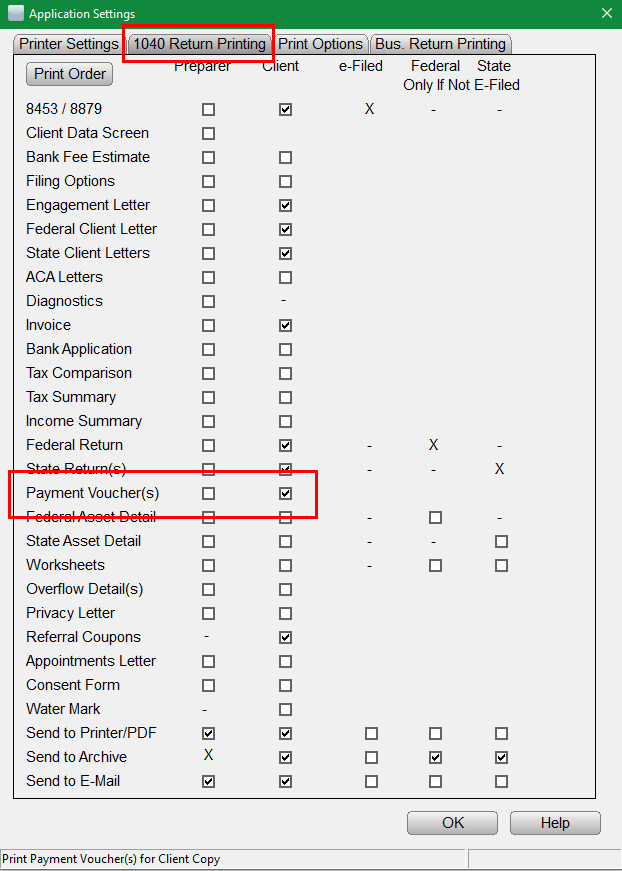
The following provided steps illustrate how to configure the program to automatically print a payment voucher with each e-filed return:
- From the Work in Progress Summary screen, click the Setup menu.
- Navigate to the 1040 Return Printing tab & verify there is a checkmark for Payment Voucher(s) in the desired print packet.
- Navigate to the Print Options tab & verify there is NO checkmark for No payment voucher with 8879.
- Click OK to finalize the settings.Â
 Â
 
Article ID: 189
Created: Sat, Jul 23, 2016
Last Updated: Mon, Jun 7, 2021
Online URL: //kb.erosupport.com/article-189.html