Error Message or Gray Screen in Attempting to View a PDF
Symptoms
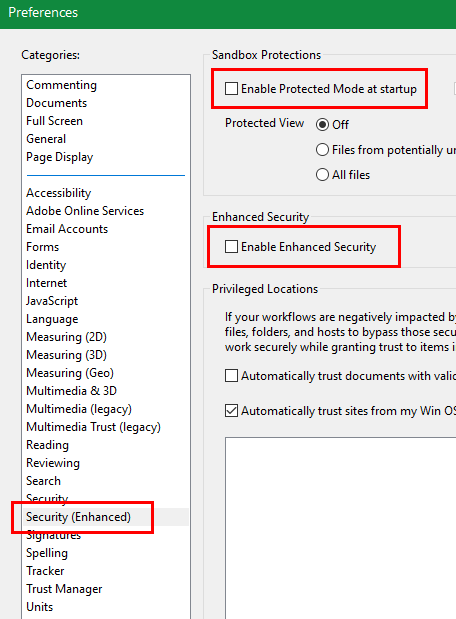
On some systems, "Enable Protected Mode at Startup" and/or "Enable Enhanced Security" can cause a gray screen or error message in attempting to view a PDF in the software.Â
Cause
The symptoms can occur when Use External PDF Reader is in use.
 Resolution
- Open Adobe Reader.
- From the top Left menu, select Edit, then Preferences.

- In the Preferences window under Categories, select Security (Enhanced).
- Uncheck both Enable Protected Mode at Startup and Enable Enhanced Security.

You may have to answer Yes to a disabling question.

- Click OKÂ to confirm changes.
- The program should now be able to open PDFs while using Adobe Reader. If this does not resolve the issue, consider using the internal reader.
Article ID: 275
Created: Mon, Aug 15, 2016
Last Updated: Thu, Mar 30, 2023
Online URL: //kb.erosupport.com/article-275.html