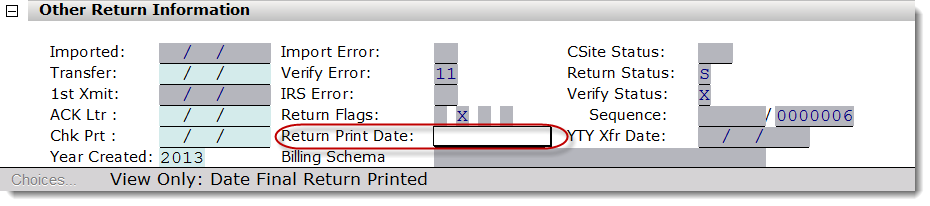
1. On a return that has been printed, there will be a Return Print Date on the Information and Status screen under Other Return Information. If the field is blank, the return has not been printed through print final return.The return has been printed and accepted.
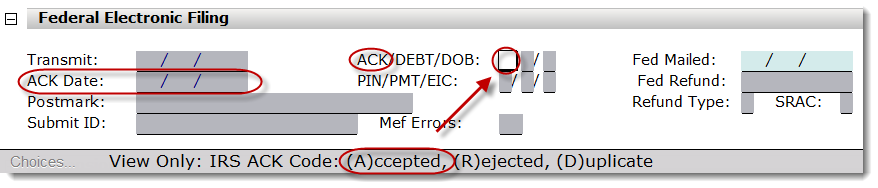
2. On a return that has been accepted, there will be an ACK code of A as well as an ACK Date on the Information and Status screen under Federal Electronic Filing.
3. The return will have Form 8948 if it is not an e-file return.The return is not an e-file return, the return has been printed, and the print option "Completed on Print Final for Paper Returns" is enabled.
Completed on Print Final for Paper Returns is located under Printer Setup on the Print Options Tab.

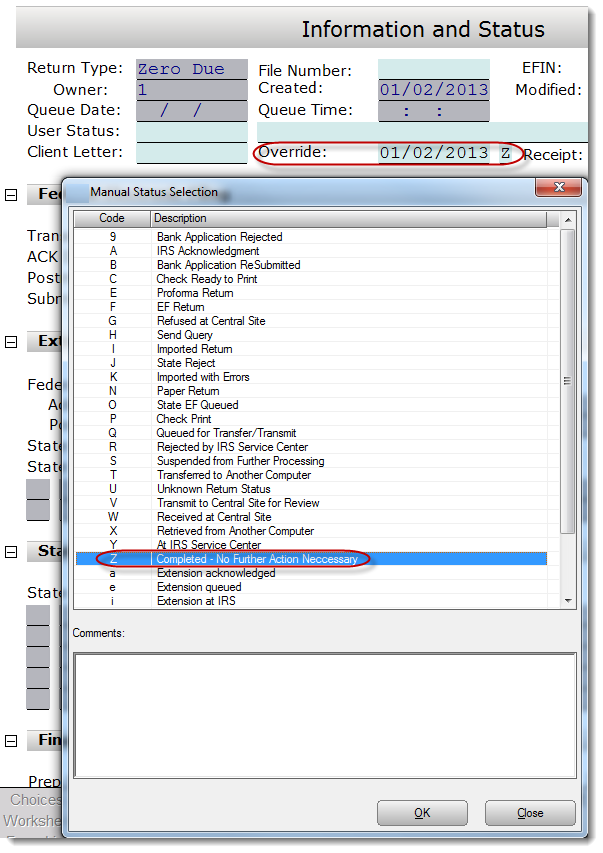
4. The return status has been manually overridden to "Completed."
The return status can by overridden by pressing CTRL-Z and selecting a status. Z will set the status to "Completed." The override shows on the Information and Status screen.
Article ID: 30
Created: Thu, Jul 14, 2016
Last Updated: Mon, Jul 15, 2019
Online URL: //kb.erosupport.com/article-30.html