Income And Information Checklist Verification Errors


Verification Alerts in The Income And Information Checklist


The following steps provide how to enable verification alerts in the Income and Information Checklist

  1. Open the program.
  2. Log in as a user with administrator access rights.
  3. Click on Setup->System Setup.
  4. Click on the Auth/Audits Tab.
  5. Click on the Tax Alerts Button.
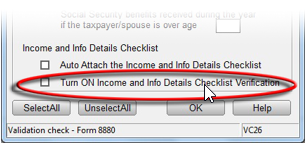
  6. Place a check in the box next to Turn ON Income and Info Details Checklist Verification.
  7. Click OK.


Article ID: 36
Created: Thu, Jul 14, 2016
Last Updated: Mon, Jul 15, 2019

Online URL: //kb.erosupport.com/article-36.html