Manually Moving Billing Files
This guide uses billYY and xlinkYY YY=yearÂ
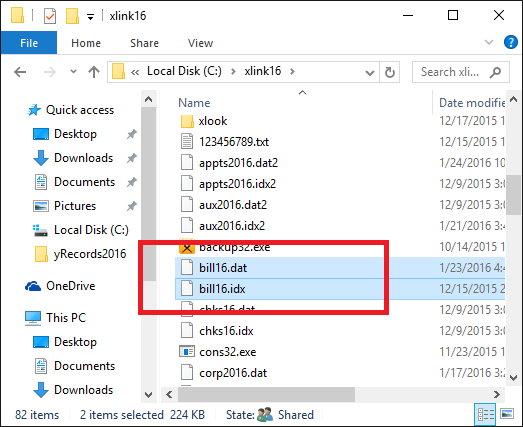
Step 1. Â First, copy/paste the billing files (billYY.dat & billYY.idx) from the xlinkYY folder onto the desktop.Â
Step 2. Â Right click on the program icon for the targeted year. Then click Open File location.
Step 3. Â Copy and paste the two files from the desktop into the targeted year of the software, and change the filename to reflect the correct year.
  
Step 4.  Launch the targeted year and select the default billing scheme. Note that in the 2016 software, this has been moved to the General Tab.

Step 5.  In the returns that are not showing the correct billing, reload the billing. This can be done inside the return as return > reload billing or CTRL + U.
Â
Article ID: 376
Created: Wed, Sep 7, 2016
Last Updated: Tue, Oct 26, 2021
Online URL: //kb.erosupport.com/article-376.html