
Symptoms
When verifying a tax return, a verify error message appears:
’US FRM 8879 The Last Printed 8879 Values do NOT match current 8879 Values - RePrint 8879’
 Â
Cause
Form 8879 was previously printed and the current values do not match the values that were printed.
Â
Reprint the 8879 or disable Last Printed Verify.
Â
Resolution 1:
Reprint Form 8879
Reprinting Form 8879 will remove the verification message. Form 8879 can be reprinted by clicking Print > Current Form Only with the 8879 open, or printing the final tax return by clicking the Print button.
Â
Resolution 2:
Disable Last Printed Verify in Print Options
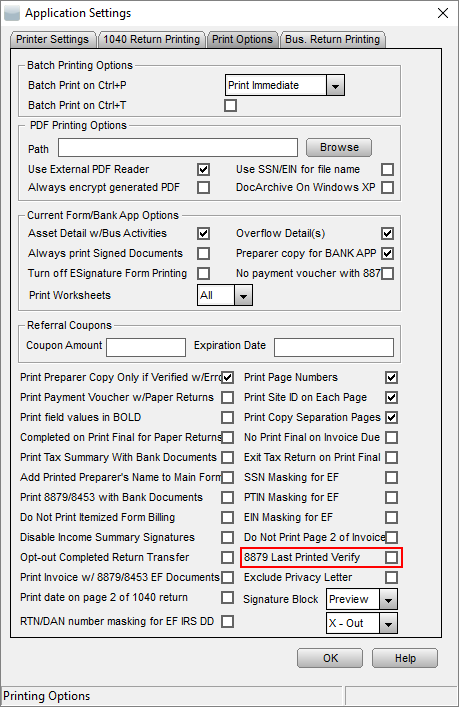
Â
The tax return should now verify successfully.
Article ID: 493
Created: Wed, Sep 21, 2016
Last Updated: Thu, Oct 28, 2021
Online URL: //kb.erosupport.com/article-493.html