How to delete an Over the Counter (OTC) payment
There is NO way to remove/delete an entry in the payments location. The suggested workaround is described below.
Â
Â
Create a reverse payment entry
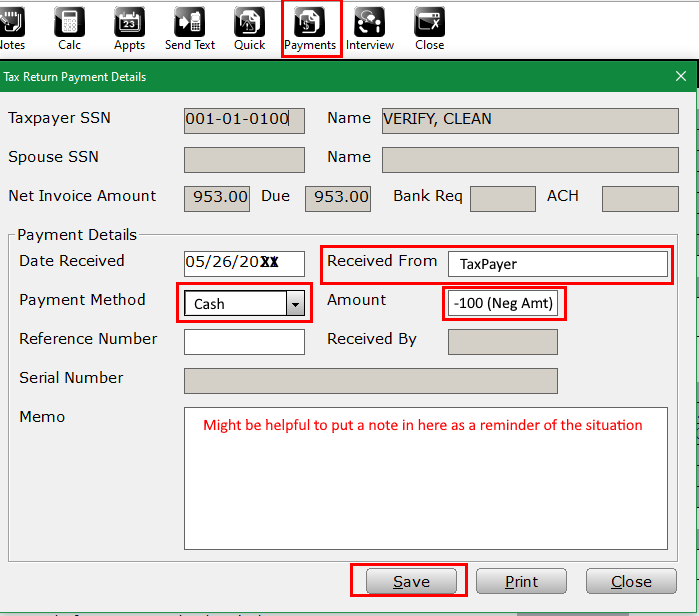
- Open the return that requires the reversal payment
- Select the Payments icon
- Input basic data in the following boxesÂ
- In the Amount box make sure there is a "-" in front of the dollar amount
- Save button will finalize the entryÂ
Â
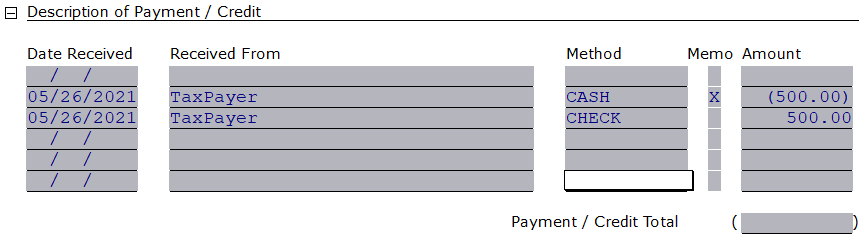
Confirm entry of reversalÂ
- Select form Invoice - Billing & Pmts
- Navigate to Description of Payment/CreditÂ
Article ID: 597
Created: Wed, May 26, 2021
Last Updated: Wed, Mar 1, 2023
Online URL: //kb.erosupport.com/article-597.html