How to setup & clear default fields within the desktop program
How to setup & clear default fields within the desktop program
This article describes how to create a default field as well as how to clear an already set default field.
 Â
Create a default field
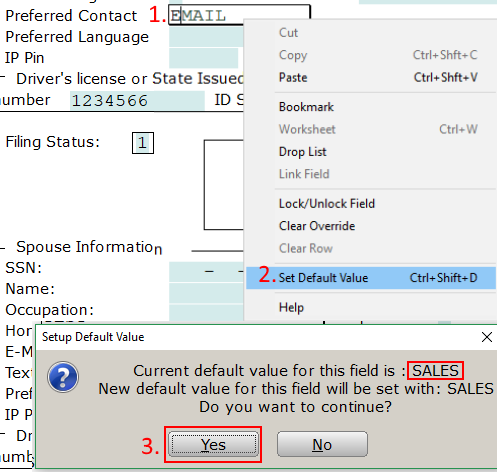
- Enter the data to become the default.
- Right Click & select Set Default Value or shortcut: CTRL + Shift + D
- Confirm the Setup Default Value by selecting Yes.Â
Â
Â
Â
Removing a default field
- Goto Setup
- Select Office Setup
- Navigate to the Defaults tab
- Select the Default Values button
- After selecting the default to remove hit the Remove button.

Article ID: 732
Created: Wed, Mar 20, 2019
Last Updated: Mon, Nov 1, 2021
Online URL: //kb.erosupport.com/article-732.html