Online Program > Billing Setup (DRAFT)
The Billing Setup function enables use of the Client Invoicing feature. This feature allows the ability to bill clients for tax preparation fees you set. This article will cover how to set and manage pricing, discounts and custom charges. Note: The use of a Billing Scheme is optional.Â
- Login to 1040 Online with EFIN/Office access level.
- Click on Office Settings from the left panel.
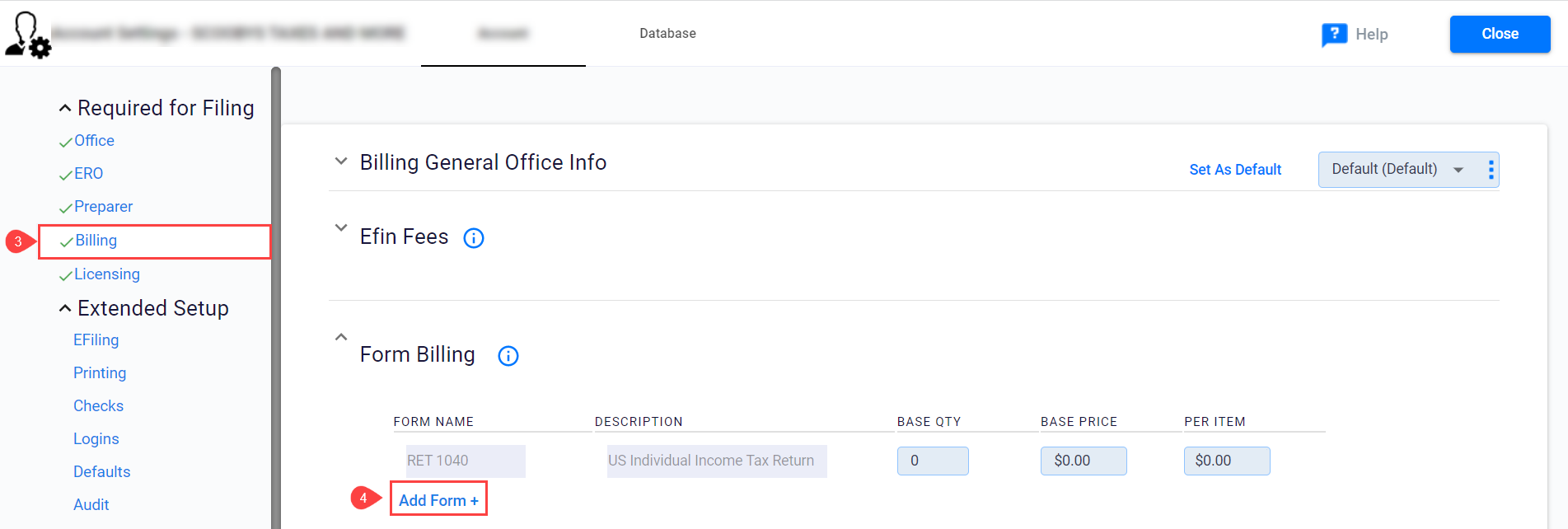
- Click on Billing and type your office information or use the Same as Office Info to autofill from the Office Settings.
- Scroll down to the Form Billing section and click on Add Form. (Utilize the arrows to minimize sections in this area.)
- Click on Advanced View to view additional options.Â

- Billing can be configured one of two ways, Base Qty and Base Price or Per Item. Each billing scheme can be configured using one or both methods.Â

Per Item Method
Use the Per Item column to charge a fee for each instance of a form. For example: To charge a $25 fee for each W-2G in a tax return, enter $25 in the per item column.
Base Qty & Base Price Method
Use this method to charge a single fee for multiple instances of an invoice line item and a different amount if the number of form instances exceeds the base quantity. Important Note: If you choose to enter a price on the Base Price you will need to enter a number in the Base Qty field also. For example: If you want to charge $10 for the first two W-2’s and $5 for each additional W-2, you would enter 2 on the Base Quantity, $10 on the Base Price, and $5 on the Per Item. That way any W2 added after the second one will be charged $5 each.
Article ID: 918
Created: Thu, Aug 11, 2022
Last Updated: Wed, Sep 14, 2022
Online URL: //kb.erosupport.com/article-918.html