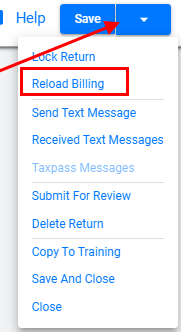
Online Program > Reload Billing


Pushing the Billing into returns is required when there is a change with the billing or bank data.

  1. From within the return.
  2. Navigate to the upper right return profile dropdown.
  3. Select Reload Billing.
  4. Verify the desired changes have occurred in the Invoice or Bank Application.


Article ID: 938
Created: Fri, Jan 6, 2023
Last Updated: Fri, Jan 6, 2023

Online URL: //kb.erosupport.com/article-938.html