How to retrieve returns into the Desktop Software
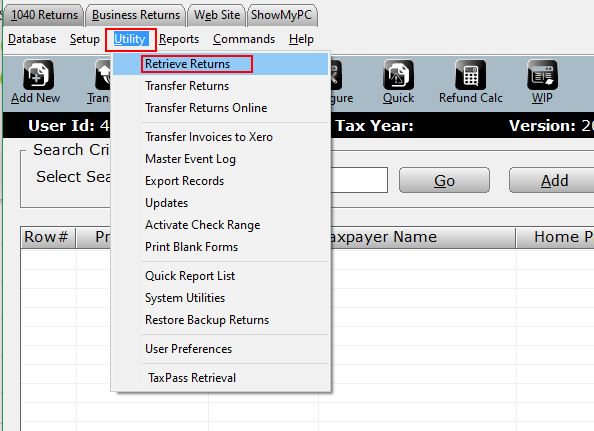
- From the Work in Progress Summary click on the Utility menu.
- Select Retrieve Returns from the dropdown menu.
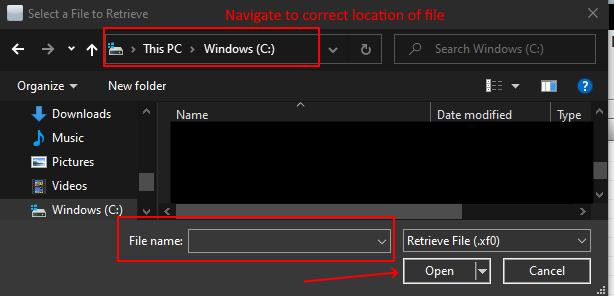
- Navigate to the location of the return file (.xf# or .xb#) and click Open.
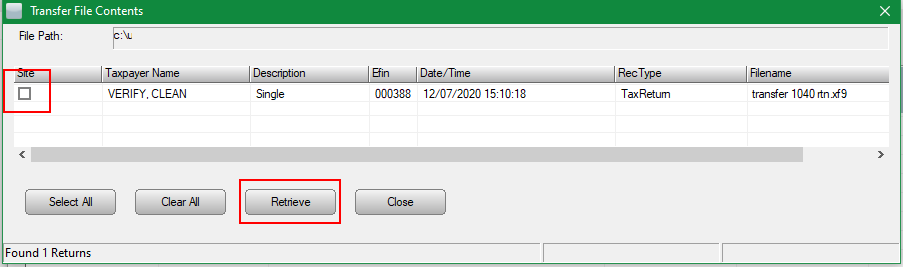
- Select the return(s) to be retrieved by checking the box in the "site" column or click the Select All button. Once returns are selected click Retrieve to import returns into the tax software.
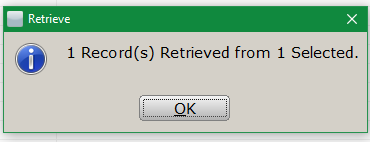
- The following message will display to indicate the record(s) have been retrieved.Â
Other related articles:
KB: 337 How to Transfer a Return Between Installations of The Program
Article ID: 244
Created: Wed, Jul 27, 2016
Last Updated: Tue, Jun 20, 2023
Online URL: //kb.erosupport.com/article-244.html