How to Customize The Spanish Client Letter
Customizing the Spanish client letter
 Follow these steps of procedure to customize selected changes that are available in the Spanish client letter.
1. Log into the program as a user with administrator rights.
2. On the top menu, select Setup->Client Letters.
3. In the Client Letter editor, from the top menu select File->Open.Â
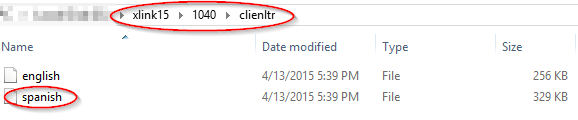
4. ​Browse to the encircled path as shown in the above.
5. Select the file named “spanish†and click Open.
6. Make all the necessary changes to the letter.
7. When completed with selecting changes, on the top menu select File->Save.
 Following these steps will ensure the changes to the Spanish client letter are saved.