When to Void a Check
|
Voiding a Check Voiding a check is used only in the most extreme cases. Most check issues can be solved using the Reprint option. The following scenarios give examples of when it is appropriate to void a bank product check:
Â
Â
In the event a check must be VOIDED in lieu of being reprinted, refer to the following:
 1. Any physical copies of the check MUST have "VOID" written on them or be shredded, according to the guidelines of the bank.
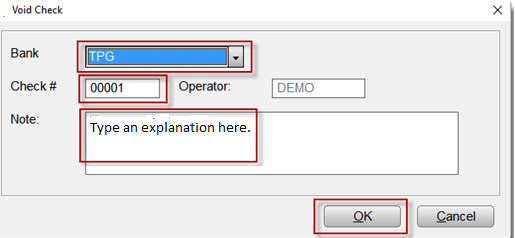
2. From the Work In Progress screen, in the Printing Queue panel, click Checks, Registers and Activation. 3. Click the Check Register Tab, select the check to be voided, then click the Void Button.   4. On the Void Check screen, select your Bank, type the check number in the Check # field, type the reason for the void in the Note field. Click the OK Button. The void request will be recorded in your Check Register.​
6. Once the new check record is received, access it under the Checks to Print Tab. |