Income And Information Checklist Verification Errors
Verification Alerts in The Income And Information Checklist
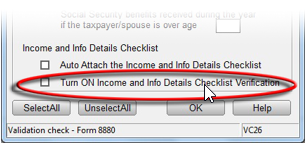
The following steps provide how to enable verification alerts in the Income and Information Checklist
- Open the program.
- Log in as a user with administrator access rights.
- Click on Setup->System Setup.
- Click on the Auth/Audits Tab.
- Click on the Tax Alerts Button.
- Place a check in the box next to Turn ON Income and Info Details Checklist Verification.
- Click OK.