Error Message: Calculated Field Value: While Printing or Verifying a Tax Return
Symptoms
While printing or verifying a tax return, a verification error message similar to the following appears:
’Calculated Field Value’
’Override of Calculated Field Value’
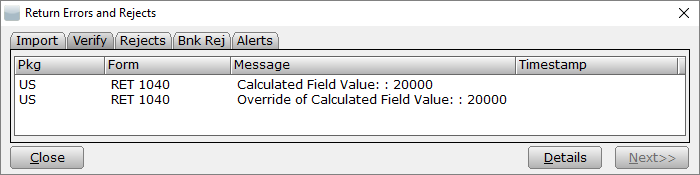
 Â
Cause
This may occur if a return is created, then a later software update changes a calculation. It may also occur if a calculated value is overridden by a preparer.
Â
Resolution
Overrides can be used to modify the calculated value in a calculated field. This error should not be ignored unless the preparer is certain that the overridden value is correct, and they have a valid reason for the override.
Â
Resolution 1:
Recalculate the field to clear the override.
- Double click the verify error to go to the overridden field.
- Press F5 to recalculate the field and remove the override.
Â
Resolution 2:
Transmit or print with error (This may be necessary when there is an override the preparer does not want to remove):
- In the return, click Transmit or Print. The Return Errors and Rejects window will open.
- If you clicked Transmit, click Next to open the Queue Return for Transmission window and queue the return as normal.
- If you clicked Print, click Next to open the Print Final Return window and print the return as normal.